The first time I set up Docker, I installed Portainer first, and its polished web interface made me assume I had a production-ready server.
Watchtower OS Linux Price Free Watchtower keeps your Docker containers updated.
Without Dozzle, I ran the docker logs command to track down an issue, but it only returned a messy wall of terminal output.
Dozzle OS Linux Price Free Dozzle is a lightweight, web-based application that allows you to monitor Docker logs in real time.
Portainer OS Linux Price Free Portainer is a lightweight, user-friendly web-based interface for managing, deploying, and troubleshooting containerized applications.
The first time I set up Docker, I installed Portainer first, and its polished web interface made me assume I had a production-ready server. However, the frantic Googling to fix broken containers that followed brought me back to reality. I had built the roof without a foundation.
Luckily, my years of provisioning servers have helped me refine my approach. Now, six containers go on fresh installations before anything else. They cover auto-updates, reverse proxy, monitoring, logging, password management, and GUI. They are my top recommendations for anyone starting with Docker. Installing them in this order helps you avoid problems with SSL certs, corrupted databases, or blind log files.
Watchtower
The first thing I automate is maintenance
Afam Onyimadu / MUO
As containers grow, they become harder to manage, and it's easy to miss when they are behind on security patches. This is one of the biggest dangers to your setup. Watchtower is the permanent fix.
Watchtower automates processes you'd otherwise do manually, including monitoring running containers, checking for updated images, and restarting them using the exact configuration after a newer version becomes available. It's important to set up Watchtower before other containers, so its monitoring will cover all containers deployed afterward. This tool removes an ongoing maintenance burden.
When I use it, I add this label in a container's compose file to ensure databases are not touched.
labels:
- "com.centurylinklabs.watchtower.enable=false"
This label makes Watchtower skip restarting databases. A database restart, especially mid-write, can lead to database corruption and permanent data loss.
Watchtower OS Linux Price Free Watchtower keeps your Docker containers updated.
Caddy
Solving HTTPS before I need it
Certificates are vital if you ever need to access services from outside your home. However, manually setting up certificates is stressful, requiring renewal timers as well as DNS and server configuration required to point a domain.
Caddy is a very simple solution for automating the entire certificate process. It automatically handles HTTPS without Certbot, cron jobs, or manual renewals. It also has a simple configuration syntax that doesn't require me to look anything up. A working entry for a new service typically doesn't exceed two lines.
There are more robust reverse proxies than Caddy, but these options usually require more configuration time. You may even use the caddy-docker-proxy plugin to include label-based routing functionality without added complexity.
For some use cases, I prefer Traefik to Caddy, but the reality is that it's overkill for most home setups or personal servers.
This container comes in second simply because it ensures that, from that point on, you get clean and secure access to every other container added to your setup.
Caddy Price model Free Caddy is an open-source web server. It acts as a powerful, automatic HTTPS-enabled reverse proxy.
Netdata
Establishing what "normal" looks like
When I started running a homelab, I waited for a problem before installing monitoring tools. In hindsight, I know it's almost impossible to recognize what went wrong if you don't know what your healthy setup looks like.
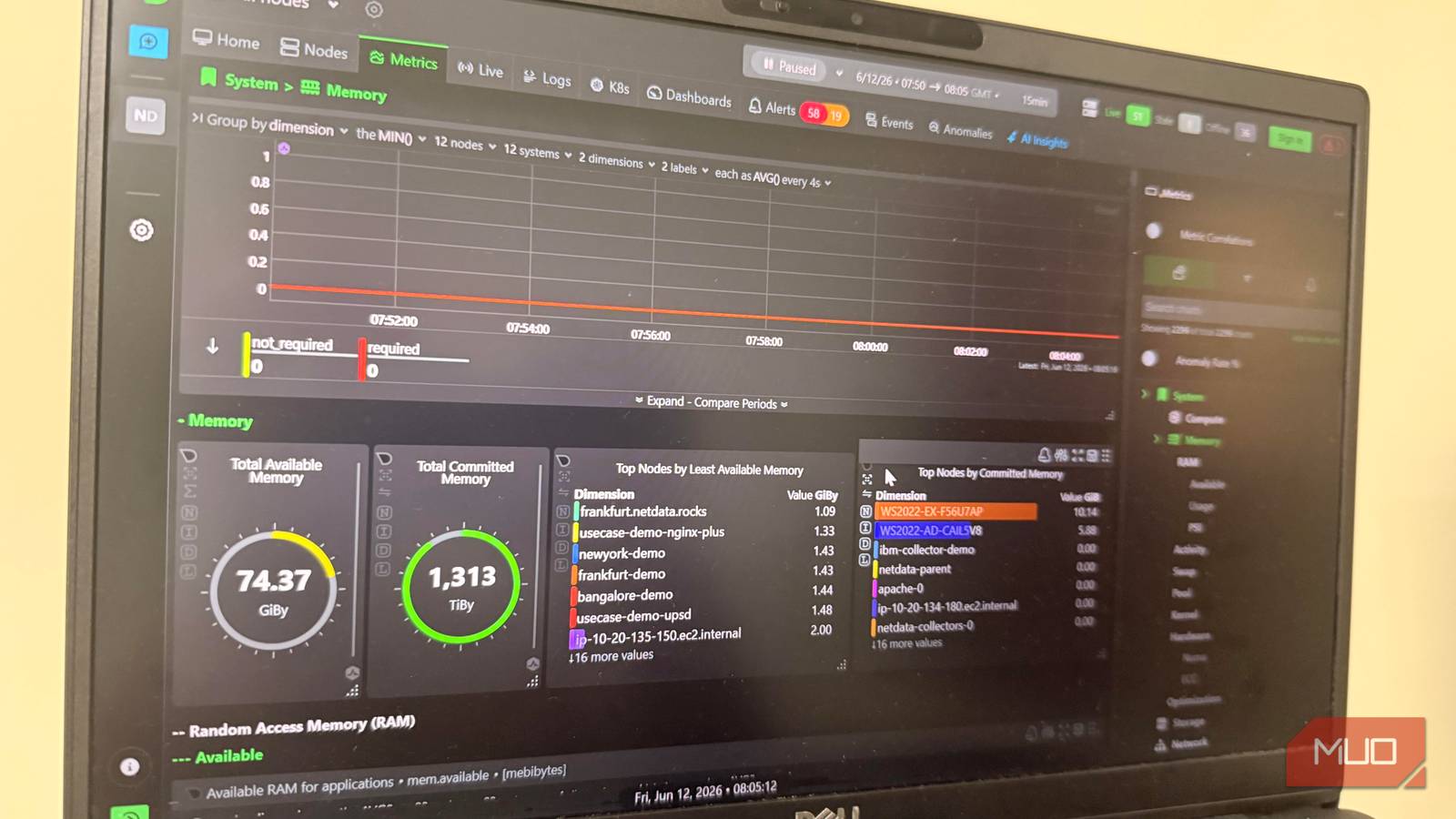
This is why Netdata is the third container that I set up. It gives me early visibility into my setup, surfacing CPU and memory usage, disk activity, network throughput, and per-container metrics. The best part is that I don't need to spend hours on configuration files before using the tool.
Netdata gives you a baseline. For instance, because I knew what normal memory usage was, when I added a new service to my setup and saw a spike in memory, I immediately knew there was a problem, what had triggered it, and what the added overhead was.
Netdata OS Linux Price Free Netdata is an open-source infrastructure and application monitoring platform.
Dozzle
The companion tool that explains the symptoms
Afam Onyimadu / MUO
With Netdata, I can see when something is wrong; to understand why, I use Dozzle, so I install it after Netdata.
Without Dozzle, I ran the docker logs command to track down an issue, but it only returned a messy wall of terminal output. I also got a chaotic screen when I streamed logs from multiple containers at once.
Dozzle replaced this chaos with a simple browser-based interface for viewing logs. Rather than repeatedly running a command to view logs, I now search and filter by container and observe new log entries in real time.
I have encountered containers stuck in restart mode. With Netdata, I can see the container disappearing and restarting. Dozzle brings clarity by showing why that is happening.
Dozzle OS Linux Price Free Dozzle is a lightweight, web-based application that allows you to monitor Docker logs in real time.
Vaultwarden
Setting up the vault before the credentials exist
Right up to this point, your server feels manageable, but it won't stay that way for long. You will be logging into applications, web tools, and services. From one database password to an admin password, the list starts to grow, and in no time, you have 20 passwords, API keys, service tokens, and credentials to manage. It's chaotic when they're scattered across note apps, a browser password manager, and text files.
Subscribe to the newsletter for Docker server foundations Get practical Docker and homelab guidance by subscribing to the newsletter: clear, actionable walkthroughs on building a resilient container foundation - Watchtower, HTTPS, monitoring, logging, password vaults and GUI best practices. Get Updates By subscribing, you agree to receive newsletter and marketing emails, and accept our Terms of Use and Privacy Policy . You can unsubscribe anytime.
That's why Vaultwarden goes on every server; it's a lightweight implementation of Bitwarden. It brings all my credentials into one place. When hosting a new service, I now first open Vaultwarden, generate and save the credentials, then complete the deployment.
Vaultwarden must be among the first containers to set up because it's easier to organize five passwords than to reconstruct fifty.
Vaultwarden Developer Daniel García Price model Free, Open-source Vaultwarden is a lightweight, self-hosted password manager compatible with Bitwarden clients, designed to run efficiently on low-resource servers.
Portainer CE
The GUI comes last now
In the past, I started by setting up Portainer. Having a graphical user interface feels intuitive, especially if you're not comfortable with the command line. However, it's a management layer and not the infrastructure itself.
Even though it offers a clean UI for deploying Compose stacks and allows you to inspect volumes and manage containers, it doesn't provide the underlying services — updates, HTTPS, monitoring, logging, and credential storage — that ensure server reliability.
By introducing it now, Watchtower updates it; Caddy ensures I can securely access it; I track its resource usage with Netdata; capture its logs with Dozzle; and store its credentials in Vaultwarden. These are essential services that Portainer doesn't provide but relies upon. Once I understood that it was just the icing on the cake, it became a convenience layer rather than a necessity.
Portainer OS Linux Price Free Portainer is a lightweight, user-friendly web-based interface for managing, deploying, and troubleshooting containerized applications.
The foundation, the right way
A server can easily become a very complex undertaking. Your goal should be to keep it as simple as possible for as long as possible. Although other tools can fill these roles, this set keeps the setup simple and easy to manage. They are the foundation; every other service comes on top of them.